If you've upgraded from an older Optimizely CMS solution lately, you may have noticed a dialog popping up every time an editor pastes content from Word into the TinyMCE rich text editor:
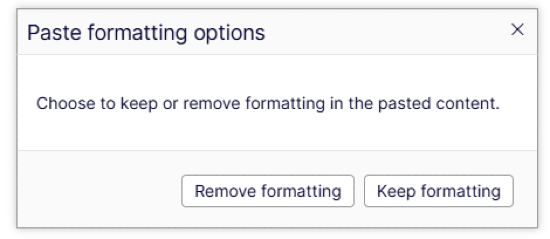
In CMS 11 this wasn't an issue — Word content was silently cleaned on paste. In CMS 12 the dialog appears by default. This post covers how to get rid of it and restore the CMS 11 behavior.
What "Keep formatting" actually keeps
When you paste text from Word and click "Keep formatting", you get something like this:
<p class="MsoNormal">
  <span style="font-size: 10.0pt; mso-bidi-font-size: 12.0pt; font-family: 'Avenir Next';">
    The text inside the p-tag.
  </span>
  <span lang="EN-US" style="font-size: 10.0pt; mso-bidi-font-size: 12.0pt; font-family: 'Avenir Next'; mso-ansi-language: EN-US;">
     More text here.
  </span>
</p>
Inline styles, MsoNormal classes, Word-specific CSS properties — all of it bleeds into your html content. If you "Remove formatting" you'll get the clean version:
<p>The text inside the p-tag. More text here.</p>
And that's the behavior we want, without the dialog.
Things that don't work
TinyMCE can be configured a lot of ways, and depending on where you look you will get another solution for fixing the issue. Here are some of the none working alternatives I found when trying to help my customer:
paste_as_text
.AddSetting("paste_as_text", true)
This is a setting that works, but it strips all HTML from the pasted content. Headings, links, lists, tables, bold, italic — gone. Everything becomes plain text. That's almost certainly not what your editors want after spending time on creating the text in Word.
vanilla TinyMCE alternatives
There is also a lot of vanilla TinyMCE solutions for this, but none of them will work when using the EPiServer.CMS.TinyMCE assembly. Examples of such settings is:
- paste_retain_style_properties
- paste_word_valid_elements
The actual solution: PasteFromWordImportType
After decompiling the EPiServer.Cms.TinyMce assembly I found a property called PasteFromWordImportType on TinyMcePropertySettingsOptions. After checking old Optimizely release notes, I also found this described in the release notes from version 4.7.0. It's an enum with three values:
Prompt- Shows the dialog (default in CMS 12)RemoveFormatting- Silently strips Word formatting, keeps structural HTMLKeepFormatting- Silently keeps everything, Word junk included
To restore the CMS 11 behavior (clean paste, no dialog) configure it in your Startup.cs/Program.cs:
services.Configure<TinyMcePropertySettingsOptions>(options =>
{
    options.PasteFromWordImportType = PasteFromWordImportType.RemoveFormatting;
});
That's all. No dialog, no Word garbage, and your editors will have one less dialog box to worry about.
In short: The only one that actually works with Optimizely's TinyMCE integration is PasteFromWordImportType. The rest target vanilla TinyMCE paste behavior that Optimizely's epi-paste plugin overrides.