The built in broken links report in Optimizely can be difficult for editors to work with, and broken links are often difficult to maintain. Broken links frustrate visitors and damage SEO. After waiting for ages for an option to have unpublished pages removed from the list, I've deceided to make my own tool for this instead. This post walks through why I built a custom replacement, how it works under the hood, and what it means for editors day-to-day.
The Built-in Link Validation Report
Optimizely CMS 12 includes a scheduled job called Link Validator that periodically checks all links stored in the tblContentSoftLink database table. It performs an HTTP GET request against each URL, records the response status, and makes the results available in the Link Validation report found at /EPiServer/CMS/reports#/LinkStatus.
The built-in report does a reasonable job of surfacing broken links. It shows:
- The page the broken link belongs to
- The broken URL
- The HTTP status code (404, 301, 403, etc.) or connection errors
- When the link was last checked
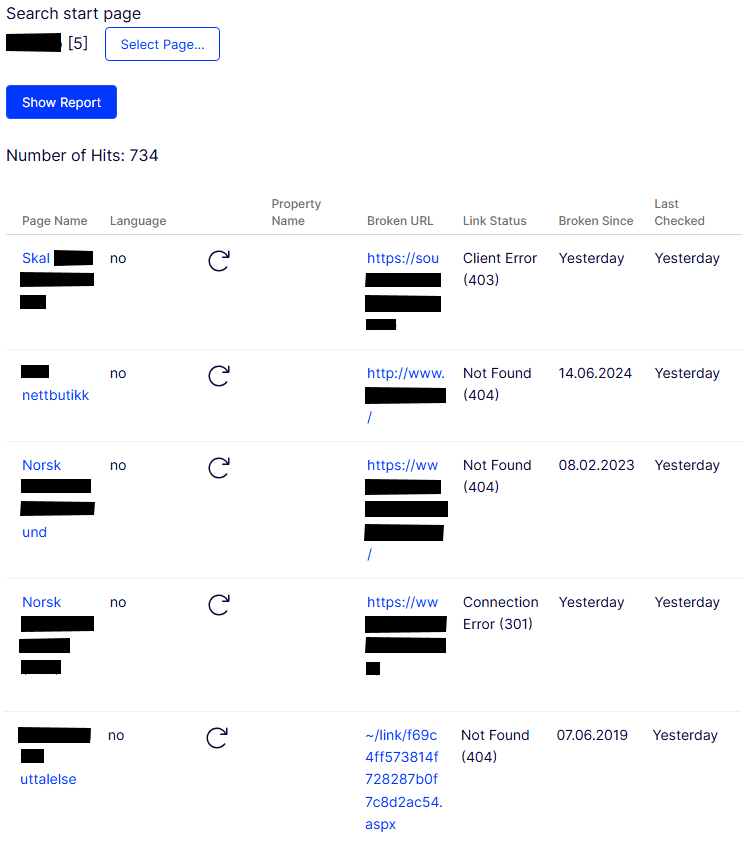
For many sites this can be good enough, but for many solutions its nice to be able to see if the page/block is published, or if the block is in use. Internal broken links is also shown a bit cryptic.
Why It's Hard to Extend
The Link Validation report in CMS 12 is part of Optimizely's shell UI, which is built on a Dojo module system. As I am not confident enough with my Dojo skills, I first tried to ask Claude to help me fix the dojo to suit my wishes in the exisiting report. That was not so successful, and also a bit risky. It looked like adding or modifying columns in the built-in report requires creating a shell module — a separate JavaScript module registered via module.config that hooks into the CMS UI framework. In practice, this means:
- Fighting with the Dojo module system and AMD dependency loading
- Risk of breaking the CMS shell UI if the module folder name clashes with ASP.NET Core's MVC Area detection
- No official extension points for adding columns to the existing report grid
- Changes that can break with all Optimizely updates
Rather than wrestling with Dojo and risk broken versions after updates, I've deceided that a easier approach was to build a standalone report as a regular ASP.NET Core controller and Razor view, protected by the standard CMS editor policy. This gave me full control, no framework constraints, and it's just normal C# and HTML.
What the Custom Report Adds
I have made a custom report that builds on the same underlying data source as the built-in report — the ILinkRepository interface — but enriches each result with for me nescessary information.
For Editors
Is the page published? That is the most actionable piece of information missing from the built-in report. A broken link on an unpublished draft/archived page should have much lower priority than one on a live page. The report shows a clear "Published" or "Unpublished" badge on every page/block, and I've added a filter in the list to show only published items — so the focus for editors is whats affectiv visitors right now.
Better labels for internal broken links The built-in report shows raw permanent link URLs like ~/link/9f5c29c8abee4ad1b8c17a4630831778.aspx for broken internal content references, which means nothing to an editor. I've tried to identify the content behind these GUIDs and shows human-readable labels such as:
- Internal link to deleted content
- Internal link to unpublished page: Annual Report 2019
- Missing media: Hero_image_autumn_campaign.png
    try
    {
        var map = _permanentLinkMapper.Find(guid);
        if (map == null)
            return "Internal link to deleted content";

        var content = _contentLoader.Get<IContent>(map.ContentReference);
        return content is MediaData
            ? $"Missing media: {content.Name}"
            : $"Internal link to inaccessible page: {content.Name}";
    }
    catch (ContentNotFoundException)
    {
        return "Internal link to deleted content";
    }
    catch
    {
        return "Internal link (unresolvable)";
    }
Block awareness Content blocks with broken links are identified with a "Block" badge. Because a block can be placed on many pages at once, the report also shows a blue "Used on X pages" badge with a tooltip listing the pages ID. This was intentionally to help editors see if the block was unused, and therefore fixing the broken link was of low priority. But it could also be helpful the other way, if a block is used on many pages, the broken link should be prioritized to be fixed because a lot of pages is affected.
Technical Overview
The report uses ILinkRepository.GetBrokenLinks(ContentReference.RootPage, skipCount, takeCount) to page through all broken links in the system. Each SoftLink object contains the broken URL, the owner content reference, the HTTP status code, and the first/last checked dates.
For each broken link, the service:
- Loads the owning content via
IContentLoaderto get its name - Checks publish status via
IPublishedStateAssessor.IsPublished() - Resolves permanent link GUIDs via
IPermanentLinkMapperto produce human-readable labels - Detects whether the content is a
BlockDatainstance, and if so callsIContentRepository.GetReferencesToContent()to find all pages using the block - Identifies the owning property by scanning content properties for the broken URL string
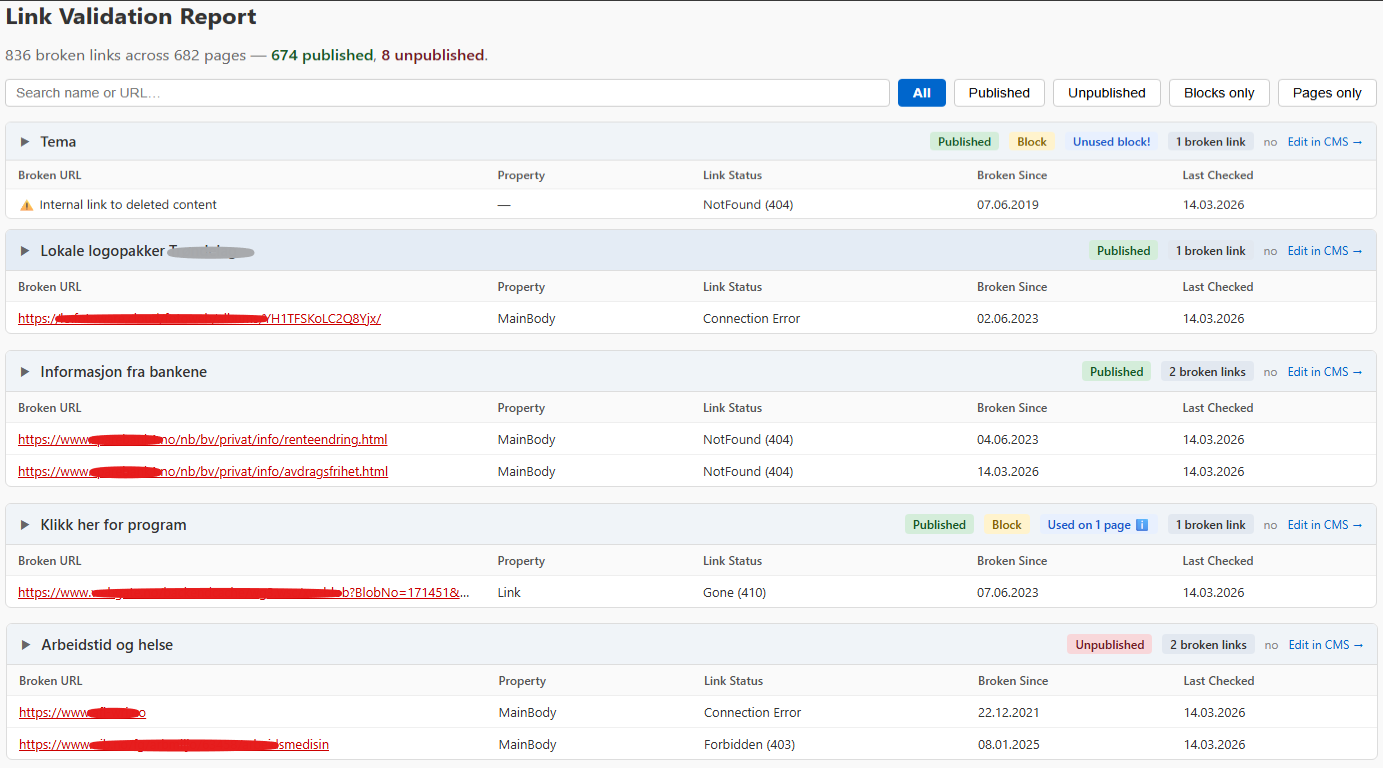
There is much that can be made better here, but for me it's a very helpful tool to have instead of the old link validation report. It is good to have more control of the code than the built in report, and new features can easily be added/removed after what each solution needs.
There is much that can be done here, but for me this solution is a better alternative than to struggle with the built-in report.